
Date: 4 August 2026

A good wiki isn’t enough—your security team wants Okta or Entra ID logins, auto-revoked seats, and SOC 2-ready logs. Yet most “best wiki” lists gush about templates and AI while pay-walling SSO or skipping SCIM, so ex-employees linger.
We closed that gap by benchmarking today’s leaders on identity (SAML/OIDC SSO + SCIM), search, setup, compliance, and true SSO cost. Next comes a ranked Top 10, a quick-scan table, and profiles you can hand straight to procurement. Let’s secure your single source of truth.

How We Scored the Platforms
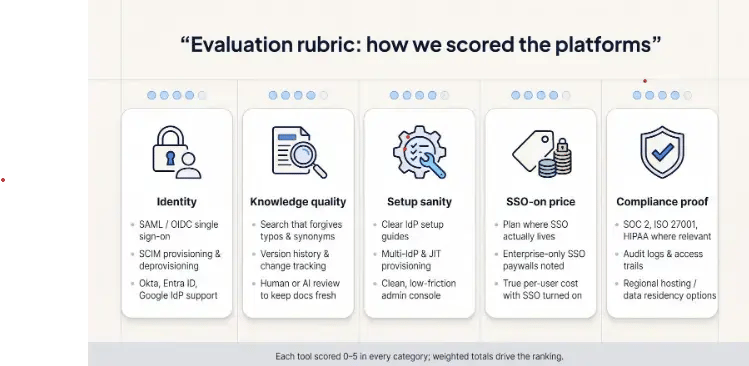
We didn’t rank these tools on gut feel or glossy screenshots. We built a five-point rubric that mirrors the questions your security and ops teams ask during every SaaS review.
First, identity. Does the platform accept SAML or OIDC logins from Okta, Entra ID, or Google, and will it also run SCIM to deactivate leavers automatically? Many vendors shout “SSO ready” yet offer only a checkbox integration that leaves stray accounts behind.
Second, knowledge quality. Search must forgive typos and synonyms, content must track versions, and someone—human or AI—has to keep pages fresh.
Third, set up sanity. Clear IdP guides, multi-IdP support, just-in-time provisioning, and a clean admin console save hours of ticket time.
Fourth, the real price once SSO is on. We noted every “Enterprise-only” paywall and calculated the uplift.
Finally, compliance proof. SOC 2, ISO 27001, HIPAA, audit logs, and regional hosting options separate marketing promises from audit-ready reality.
Each tool earned up to five points in every category; the weighted totals drive the ranking you’ll see next.
The Security Overview at a Glance
Before we dig into the individual winners, here’s the quick view. Scan the grid, mark the rows that match your must-have checklist, then keep reading for the back story behind every score.
.webp?width=777&height=432&name=Security%20Overview%20at%20a%20Glance%20%20(1).webp)
|
Platform |
SSO Protocols |
SCIM |
Plan Where SSO Lives |
Starting Price (with SSO) |
Key Compliance |
Content-freshness edge |
Overall Score* |
|
Slite |
SAML, OIDC |
Yes |
Pro |
$20 user/mo |
SOC 2, HIPAA |
Slite Agent (AI maintenance) |
4.5 |
|
Confluence |
SAML, OIDC |
Yes |
Add Atlassian Access |
$9 user/mo |
SOC 2, ISO 27001 |
Huge plugin market |
4.3 |
|
Notion |
SAML |
Yes |
Business |
$20 user/mo |
SOC 2 |
Flexible workspaces |
4.1 |
|
Guru |
SAML |
Yes |
Enterprise |
~$22 user/mo |
SOC 2 |
Verification workflow |
4.0 |
|
Document360 |
SAML, OIDC, JWT |
Yes |
Enterprise |
~$499 org/mo |
GDPR |
AI semantic search |
3.9 |
|
Bloomfire |
SAML, OIDC |
Yes |
Standard |
Quote |
SOC 2, HIPAA |
Self-healing KB |
3.8 |
|
Slab |
SAML |
Yes |
Business |
$12 user/mo |
SOC 2 (pending) |
Unified search |
3.7 |
|
Stack Overflow Teams |
SAML, OIDC |
Yes |
Business |
$12 user/mo |
SOC 2, ISO 27001 |
Q&A reputation engine |
3.6 |
|
Zendesk Guide |
SAML, JWT |
Yes (agents) |
Suite Enterprise |
$215 agent/mo |
SOC 2, HIPAA |
Ticket-to-article flow |
3.4 |
|
GitBook |
SAML |
Partial† |
Enterprise |
Quote |
— |
Docs-as-code Git sync |
3.2 |
*Scores are weighted using the rubric above.
†GitBook syncs users through GitHub teams or API; formal SCIM is on their roadmap.
Keep this table close. It turns a long vendor list into a short shortlist the moment your CISO asks, “Which ones tick both SSO and SCIM without blowing up the budget?” We’ll unpack each row next, starting with the platform that tops the chart on identity, usability, and cost discipline.

1. Slite: A Wiki That Refuses to Go Stale
Slite feels more like Slack than SharePoint, and that’s the point. Open a page and you’re greeted by clean, distraction-free editing, live cursors, and an async comment thread that keeps side-conversations out of email.

Slite wiki interface and security-ready knowledge base screenshot
Security comes baked in rather than bolted on later. Slite hooks into your identity provider with SAML and OIDC SSO and lets you enforce login-only access across the workspace. Automated SCIM provisioning lives on the Enterprise tier, so new hires appear instantly and off-boarded staff vanish without admin chase-downs.
Content quality is where Slite pulls ahead. Slite Agent (launched June 2026) detects stale or missing docs by cross-referencing Slite docs against Slack, Linear, GitHub, Intercom, and 20-plus connected tools. It acts by proposing changes, updating existing docs from natural-language intent, or using the Slite MCP (available on all plans, including Basic) to write new docs, merge duplicates, restructure sections, rename, archive, and change ownership. Crucially, control remains with you: every change routes through a human-review Triage UI, and nothing is auto-applied.
Pricing is refreshingly transparent. The Basic plan is $10 per user each month (billed yearly) and includes AI Ask limited to Slite docs. The Pro plan costs $20 per user each month (billed yearly) and unlocks SAML and OIDC SSO, Slite Agent, cross-tool AI search, agent workflows, 50 agent credits per seat, and HIPAA compliance. Step up to custom Enterprise pricing, and you add SCIM, reader-only seats, audit logs, and priority support, usually still below the sticker shock of older incumbents. For growing tech companies juggling rapid onboarding and compliance demands, that trade-up is easier to defend at budget meetings.
These identity and freshness strengths echo the criteria Slite spotlights in its 2026 comparison of knowledge base software, where self-maintaining updates and SSO affordability outrank cosmetic perks. Bottom line: If you want a wiki that stays accurate by design and slots neatly into Okta without weeks of configuration, Slite earns the first spot on your shortlist.
2. Atlassian Confluence: The Enterprise Old Guard
Confluence is the heavyweight your admins already know. Spaces, page trees, macros, and a marketplace full of plug-ins give it wide flexibility, which is why many engineering teams treat it as home base.
Identity flows through Atlassian Guard (formerly Atlassian Access). Hook it to Okta or Entra ID once, and you turn on SAML SSO and full SCIM provisioning across Confluence, Jira, and Trello in one sweep. Guard adds $4.20 per user each month on top of your Confluence seats, yet it still beats buying separate SSO add-ons for several tools.

Atlassian Confluence with Atlassian Guard SSO and SCIM administration
Granular permissions are its strong suit. You can lock a single page to the finance group while leaving the rest of the space open to the company, all driven by IdP groups. The audit log records every view, edit, and permission change, which keeps compliance teams smiling.
Usability shows its age. Non-technical teams often note that search turns noisy once thousands of pages pile up, and the interface feels dated beside newer wikis. Content freshness stays manual with no built-in review cycles, so pages drift out of date unless a governance champion owns them.
Cost scales fast. Standard plus Guard lands around nine dollars per user each month; jump to Premium for advanced analytics and you will push past thirteen. Still, if your company already lives in Jira, paying that uplift is simpler than training everyone on a new platform.
For large, process-heavy enterprises that value iron-clad permissions over minimalism, Confluence remains a safe, if sometimes bulky, choice.
3. Notion: Flexibility Meets an SSO Paywall
Notion is the Swiss Army knife of workspaces. Wikis, project boards, and relational databases all sit on a single, endlessly tweakable canvas. Teams love the freedom; security teams, less so, until Enterprise features enter the chat.
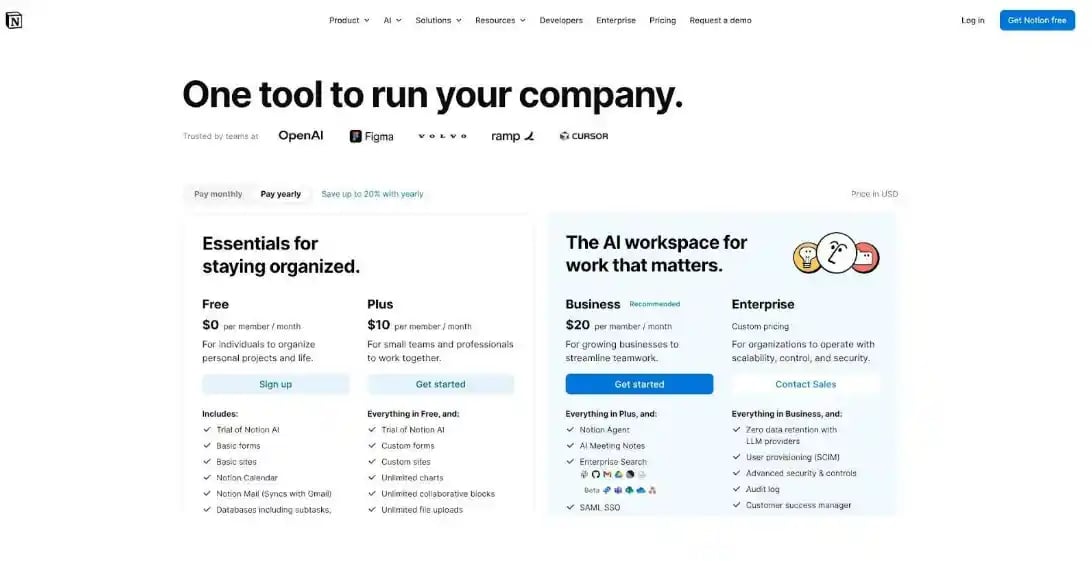
Business and Enterprise flip the security switch. Turn on Business and you gain full SAML single sign-on. Upgrade to Enterprise for SCIM provisioning, pushing user adds and removals straight from Okta or Entra ID to every Notion space. Lower tiers allow Google sign-in and basic controls, yet withhold true SSO. The jump from Business to Enterprise for SCIM and audit logs averages a fifty-plus percent price hike, a classic “SSO tax.”
Notion Business and Enterprise pricing with SAML SSO and SCIM features
Once authenticated, permissions stay flexible to a fault. You can gate an entire workspace to the finance group, share a single page with a contractor, or embed a live Figma mock-up for marketing. That power demands discipline; without naming rules and page-owner conventions, content sprawl creeps in fast.
Search is quick for small teams but remains keyword-driven. If your knowledge base tops a few thousand pages, plan on strict tagging or a third-party semantic add-on. Notion AI helps produce summaries and drafts, yet it doesn’t verify content freshness the way Slite or Guru does.
Price clarity ends at the Enterprise door. Expect roughly twenty-five to thirty dollars per user each month to gain SSO and SCIM, plus an implementation checklist for audit logs and API access. For companies already living in Notion’s flexible universe, that upgrade is usually cheaper than migrating elsewhere. For everyone else, weigh the creative upside against the premium you’ll pay for identity essentials.
Bottom line: Notion offers broad adaptability, but you’ll write a bigger check before your CISO signs off.
4. Guru: Verified Answers in Your Workflow
Guru addresses a problem most wikis ignore: confidence. Instead of long pages, it stores bite-sized cards, each stamped with an owner and an expiry date. When that timer runs out, the card turns yellow until the expert re-verifies it. Your agents stop asking, “Is this SOP still current?”
Identity keeps everything airtight. Enterprise customers wire Guru to Okta or Entra ID with SAML SSO, then turn on SCIM so new hires receive the right Collections on day one and leavers lose access before their farewell cake cools. Group mapping stays simple: drop someone in the “Support-L2” IdP group, and Guru mirrors those permissions instantly.
The magic happens where work happens. Search Guru from Slack, paste a card into a Zendesk reply, or let the Chrome extension surface answers while you fill a Salesforce field. Because every call routes through SSO, audit logs show exactly which rep viewed which policy at 2:17 p.m.
Costs sit squarely in enterprise territory. The top tier, at roughly twenty-two dollars per user each month, is required to access SSO and SCIM. The upside: Guru charges only for active knowledge users, so large read-only audiences don’t inflate the bill.
Choose Guru when speed and accuracy beat page hierarchies. Support, sales, and finance teams appreciate that a verified snippet appears faster than a wiki search can spell “authentication.”
5. Document360: Built for Docs, Priced for Enterprises
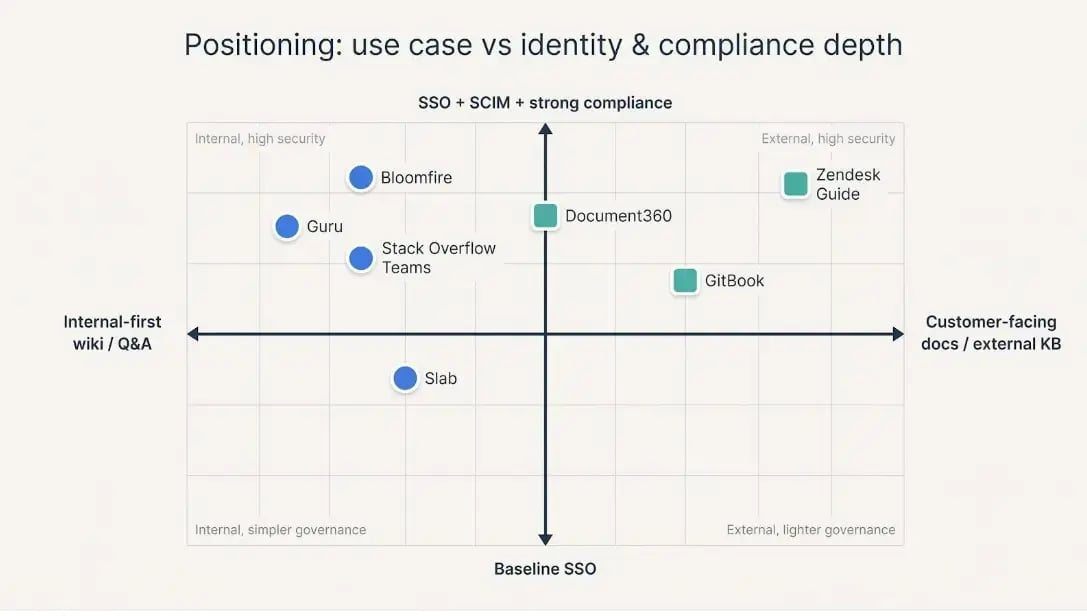
Document360 is a documentation workhorse. Open the editor and you’ll find markdown support, unlimited category nesting, and side-by-side version diffs, features technical writers crave.
Security options match that depth. SAML and OIDC SSO hook into every major IdP, while SCIM provisioning keeps your user list tidy. Flip a toggle and every login funnels through your identity provider; enforcement is site-wide, so no stray password bypasses. Every sign-in, article edit, and permission tweak lands in an immutable audit log, gold for SOC 2 evidence.
Search is smarter than most. Its semantic engine understands intent and respects permissions, so users never see links they can’t open. Pair that with private-public zoning and you can expose customer docs while locking internal runbooks behind SSO, all in the same portal.
The catch is cost. SSO and SCIM sit behind the Enterprise curtain, which starts around five hundred dollars a month for smaller teams. That jump stings if you only need a handful of authenticated writers, yet it feels fair once you have hundreds of readers and must prove every access path.
Choose Document360 when your knowledge base looks more like an API reference library than a quick-hit wiki, and when audit trails carry real regulatory weight.

6. Bloomfire: Search-First Knowledge With Compliance DNA
Think of Bloomfire as a corporate memory vault. Upload a PDF, video, or slideshow, and its engine transcribes, indexes, and makes every word searchable within minutes. Employees type a plain-language question and land on the exact time-stamp in a training video where the answer lives. Adoption climbs because finding info feels easy.
Security isn’t an after-thought. SAML SSO and SCIM provisioning ship as table stakes, not paid add-ons, so every login flows through your IdP and every org chart change mirrors instantly. For highly regulated sectors, Bloomfire layers on SOC 2 Type II, HIPAA readiness, and audit logs that map each view back to a named user, giving outside auditors clear evidence.
Admins value the engagement heatmap. You see which articles save the most tickets, which search terms return zero hits, and which teams never open the playbook you spent weeks writing. Armed with that data, content owners can update pages before stale info leads to policy breaches.
Pricing is opaque but inclusive. You’ll need a quote, and it won’t be the lowest line item in the stack. The offset is predictable security: no “upgrade for SSO” surprises and no per-reader limits. Large banks and insurers buy it for exactly that certainty.
If your board expects airtight compliance evidence and your frontline teams refuse to dig through page trees, Bloomfire’s search-first, identity-locked hub is worth the sales call.
7. Slab: Lightweight Wiki, Enterprise Credentials
Slab wins fans by staying out of the way. Pages load fast, editing feels like Notion minus the visual clutter, and its unified search can pull hits from Google Drive, Slack, and GitHub alongside native docs.
Security keeps pace with that simplicity. The Business plan, at twelve dollars per user, already provides SAML SSO and SCIM provisioning, a rarity at this price. Setup is a five-field form: paste your IdP metadata, choose the default access policy, and save. Group mappings let HR docs appear only for the “PeopleOps” squad without extra clicks.
Content governance is lighter than rivals'. Version history is automatic, but there’s no built-in review cadence or verification banner. If your compliance team needs proof of periodic attestations, you’ll need a manual workflow or a Zapier reminder.
Where Slab shines in adoption speed. Most teams ship their first wiki in an afternoon, thanks to importers for Confluence, Markdown folders, and Google Docs. No plug-in roulette, no theme tweaking, just links that work and a keyboard-driven editor devs and marketers both enjoy.
For mid-size companies that want enterprise login without extra bulk, Slab delivers a clean win at a predictable price.
8. Stack Overflow for Teams: Turn Tribal Fixes Into Auditable Q&A
If Confluence is a library, Stack Overflow for Teams is a lively help desk. Employees ask real questions, experts post accepted answers, and every exchange is tagged, searchable, and rewarded with reputation points that spark healthy competition.
Identity hooks come enterprise-ready. Business and Enterprise tiers include SAML SSO plus SCIM provisioning, so a developer leaving the “Platform” Okta group sees access vanish before their laptop is boxed. Running multiple IdPs after a merger? Teams can handle that, too, without custom code.
Compliance teams appreciate the visibility. Each question, answer, vote, or edit lands in an audit log tied to a verified user, not an anonymous handle that complicates incident reports. Need stronger walls? Enterprise customers can spin up a single-tenant, VPC-isolated instance with bring-your-own-key encryption.
The Q&A format drives adoption among engineers. It mirrors the public site they already visit daily, which cuts the training curve to near zero. Over time, duplicate questions drop and tacit know-how that once lived in Slack threads graduates into evergreen answers.
Cost sits mid-pack. Business runs about twelve dollars per user monthly and already grants SSO and SCIM. Enterprise bumps the price but adds dedicated support and the private-cloud option many regulated shops need.
Choose Stack Overflow for Teams when your biggest knowledge gap is the same Python error surfacing in twenty Slack channels. One accepted answer, identity-secured and forever searchable, repays the investment quickly.

9. Zendesk Guide: Customer-Facing KB, Enterprise Sign-on Included
If your support org already lives in Zendesk, Guide is the fastest route to a branded help center secured by the same login your agents use. One admin console governs tickets, chats, and articles, so knowledge and support metrics share a single dashboard.
SSO flexibility is Guide’s strong suit. Run one SAML connection for internal agents and a separate JWT or SAML setup for customers, handy when buyers insist on using their own IdP. SCIM support automates agent provisioning, while customer identities usually flow from your product or CRM.
Publishing controls suit a regulated workflow. Drafts route through approvals, article history is immutable, and a built-in API lets you trigger re-reviews when a related ticket exposes a gap. Add Zendesk’s Answer Bot and customers get instant suggestions drawn only from the articles their role can see.
The downside is packaging. You seldom buy Guide alone; it comes inside Zendesk Suite Enterprise at about two hundred fifteen dollars per agent each month. For teams already paying that bill, SSO feels “free.” For a company shopping purely for an internal wiki, the bundle is expensive overkill.
Choose Guide when deflecting support tickets is mission-critical and when giving customers a single, authenticated portal beats running two separate knowledge bases.
10. GitBook: Docs-as-Code Meets the Enterprise Checklist
GitBook embraces the docs-as-code ethos. Writers work in a block-based editor while developers can sync changes via Git, bridging the gap between technical and non-technical contributors.
Single sign-on keeps that hybrid flow secure. SAML SSO is fully supported, and formal SCIM provisioning is on the roadmap; for now you can mirror GitHub teams or push updates through the API. Enterprise customers can also require 2FA, enforce session timeouts, and export detailed audit logs.
Developers love the Markdown-first workflow. Non-technical teammates enjoy the what-you-see editor that renders code snippets and embeds without friction. Version comparison shows diffs line by line, and branch-based previews let reviewers comment before anything reaches production.
Pricing is request-only. Enterprises often negotiate annual contracts that bundle private hosting, custom domain SSL, and priority support. The security feature-set is competitive, but you’ll need to press sales for a timeline on native SCIM.
GitBook fits best when your docs live close to your codebase and your developers already rely on Git workflows.
Conclusion
Securing your knowledge base with robust SSO and SCIM support protects sensitive information and streamlines onboarding and off-boarding. Use the rubric and detailed vendor breakdowns above to match features and pricing to your compliance checklist and growth plans.
.webp)


.webp)