Date: 22 December 2025
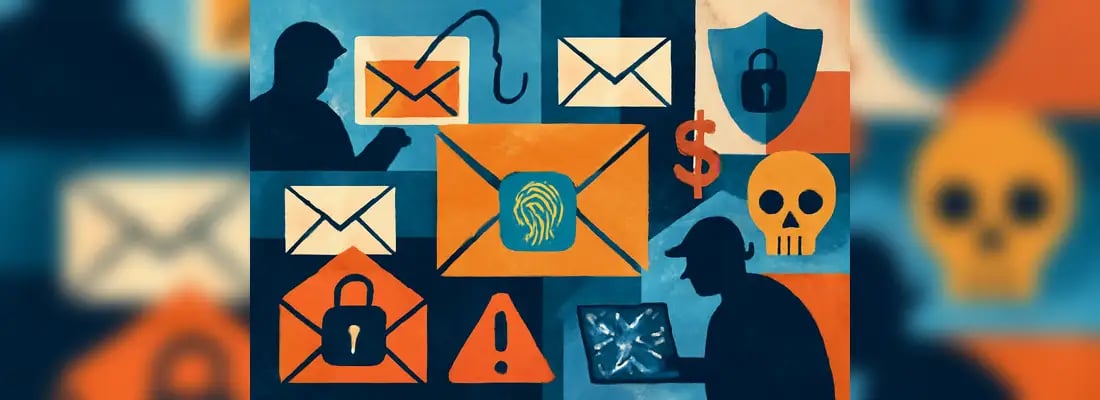
That email notification pops up. It's from a brand you know, telling you to update your account details immediately. It looks official, so you click. But what if it's a trap? It's a common scenario, and it's called phishing. It's one of the oldest tricks on the internet, but it's still surprisingly effective.
Phishing attacks are designed to fool you into giving away your personal information, and they're getting smarter all the time. But you have the power to protect yourself. This guide will show you exactly how to dissect a phishing email, spot the red flags, and keep your valuable information safe. You’ll walk away with the confidence to tell a real message from a fake one every single time.
What is a Phishing Scam?
- Phishing is a prevalent online scam, responsible for over 90% of data breaches, costing billions annually.
- Key indicators of phishing include suspicious sender addresses, generic greetings, poor grammar, and urgent requests for personal info.
- Types of phishing include spear phishing, whaling, and clone phishing, each targeting specific individuals or companies.
- Protect yourself by using strong passwords, enabling multi-factor authentication, and confirming suspicious requests through official channels.
- Awareness and education are your best defences against these scams. It's also important to share your insights with family and friends.

Building Your Online Business Presence Safely
Creating a strong online presence for your business is a must in today’s online world. Whether you’re setting up a website, social media profiles, or online marketplaces, having a professional business email address is a key component. It not only builds trust with your customers but also ensures your communication remains professional and credible. This email address becomes the backbone of your digital interactions, from customer inquiries to order confirmations. Treat it as a critical asset in establishing your brand’s reliability.
However, with the convenience of being online comes the responsibility of staying secure. Cyber threats like phishing, malware, and data breaches can harm your business and its reputation. That’s why following security guidelines is non-negotiable. Use strong, unique passwords, enable multi-factor authentication (MFA), and stay vigilant against suspicious emails or links. Proactively implementing these measures protects sensitive business data and ensures your hard-earned online presence remains safe and trustworthy.
The Growing Threat of Phishing
During a phishing scam, attackers impersonate a legitimate company or person to trick you into revealing sensitive information. This could be anything from passwords and credit card numbers to your social security number. What started as simple, poorly written emails has evolved into highly sophisticated and personalised attacks.
The numbers are pretty staggering. Phishing is a primary method used in over 90% of data breaches, leading to billions of dollars in losses for both individuals and companies. A single click can result in identity theft, drained bank accounts, or even a massive data breach for your entire company. It’s a serious threat with real-world consequences. A well-known tech company once lost over $100 million because employees were tricked by fake invoices sent from an attacker impersonating a vendor.
It's easy to think, "that won't happen to me." But these scams are designed to exploit basic human psychology. They can work on anyone, from tech newbies to seasoned CEOs. The truth is, anyone can fall for a clever phishing attempt. That's why having proactive security measures and knowing what to look for is your best defence.

Types of Phishing Attacks
Not all phishing emails are created equal. Scammers use different approaches depending on who they're targeting.
Email Phishing (Traditional)
This is the classic, wide-net approach. Scammers send out thousands of generic emails hoping a few people will bite. These often pretend to be from big companies like Amazon, Netflix, or your bank.
Spear Phishing
This is where things get personal. Spear phishing attacks are aimed at a specific person or organisation. The attacker does their homework, using details from your social media or company website to make the email incredibly convincing. Because it feels so personal, the success rate is much higher.
Whaling
Whaling is just spear phishing for the big fish. These attacks target high-level executives like CEOs or CFOs. The goal is often to trick them into authorising large wire transfers or revealing confidential company strategy. This is also known as Business Email Compromise (BEC).
Clone Phishing
This technique is especially sneaky. An attacker takes a real email you've received, copies it, and then swaps out a legitimate link or attachment with a malicious one. They then resend it from an email address that looks like the original sender's, often with an excuse like "updated link."
Other Phishing Variants
The threat isn't limited to your inbox. Smishing uses text messages (SMS) to send malicious links, while Vishing happens over the phone (voice phishing). Using a scam text checker helps you quickly verify suspicious SMS. You might also see phishing attempts on social media platforms, often through direct messages with tempting offers.
The Psychological Playbook: How Scammers Manipulate You
Phishing works because it plays on our emotions and natural instincts.
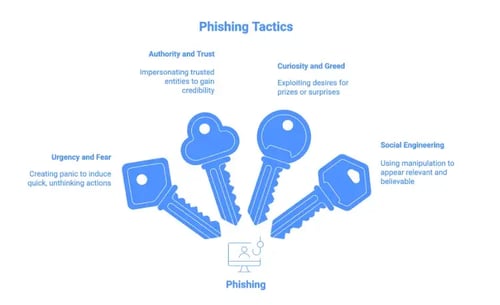
Urgency and Fear Tactics
Emails that create a sense of panic are a classic phishing move. You might see subject lines like "Your Account Has Been Suspended!" or "Suspicious Login Attempt." They want you to act fast without thinking, so you'll click before you have a chance to spot the scam.
Authority and Trust Exploitation
Scammers love to impersonate people or organisations you trust, like the government, your bank, or even your boss. They use official-looking logos and email formats to appear legitimate. Some may even name-drop a colleague or executive to make the request seem credible.
Curiosity and Greed
Who doesn't love a good surprise? Attackers exploit this with messages like "You've won a prize!" or "Your package is ready for delivery." They dangle something you want to get you to click a link or open an attachment. The offer is always too good to be true, because it is.
Social Engineering Techniques
Social engineering is the art of manipulation. Attackers might create a false sense of familiarity or use current events, like a natural disaster or a popular new movie, to make their scam seem relevant and believable.
Deconstructing a Phishing Email: Red Flags to Watch For
You can become an expert at spotting fakes. Here’s a checklist of things to look for every time you open a questionable email.
The Sender's Email Address
This is often the biggest giveaway. Look closely at the email address, not just the display name. Scammers use slightly misspelled domains (like micros0ft.com) or use free email services (like gmail.com) for official business. If the display name says "PayPal," but the email is from secure-payment84@yahoo.com, it's a scam.
Generic or Unusual Greetings
Legitimate companies you have an account with will usually address you by name. If you see a generic greeting like "Dear Valued Customer" or "Hello Sir/Madam," be suspicious.
Poor Grammar and Spelling
While AI is making this less common, many phishing emails are still riddled with typos and awkward phrasing. Read the email carefully. If it sounds like it was written by a robot or translated poorly, it probably was.
Suspicious Links and URLs
Always hover your mouse over a link before you click it. Your browser will show you the actual destination URL in the bottom corner of the window. Scammers often use URL shorteners or misspelled domains to hide the true destination. Also, while https is more secure, it doesn't guarantee a site is safe.
Unexpected Attachments
Be very careful with attachments, especially if you weren't expecting them. Malicious attachments often come as .zip files or documents that ask you to "enable macros." These can install harmful software on your computer. If you get an invoice you don't recognize, don't open it.
Requests for Sensitive Information
This is a huge red flag. Your bank, the IRS, or any other legitimate organization will never ask you to provide your password, PIN, or full social security number via email. Period.
Threatening or Urgent Language
Any email that pressures you to act immediately is suspicious. Scammers use urgent language to make you feel like you have no choice but to comply. Real organizations give you time to respond through official channels.
Mismatched or Suspicious Branding
Look at the email's design. Is the company logo pixelated or low-quality? Are the colors or fonts slightly off? Does it lack the usual footer with contact information and social media links? These are all signs of a fake.
Too Good to Be True Offers
If an email claims you've won the lottery, inherited a fortune from a long-lost relative, or can get a free iPhone just by paying for shipping, it’s a scam. You know the old saying: if it sounds too good to be true, it is.
Advanced Phishing Techniques to Watch For
Scammers are constantly upping their game with new technology.
Business Email Compromise (BEC)
In a BEC attack, a scammer gains access to a real company email account and uses it to send fraudulent requests, like asking the finance department to wire money to a new bank account. Since the email is coming from a legitimate internal address, it's very hard to spot.
Man-in-the-Middle Attacks
Here, an attacker intercepts communication between two parties. For example, they might intercept an invoice from a vendor, change the bank account details to their own, and then forward it to the customer for payment.
AI-Generated Phishing
Tools like ChatGPT allow scammers to create perfectly written, highly personalized phishing emails in seconds. AI-powered voice cloning is also making vishing attacks more convincing than ever.
Credential Harvesting
These scams direct you to a fake login page that looks identical to the real one. When you enter your username and password, you're handing them directly to the attacker.

Conclusion: Your Defense Starts With Awareness
The online world offers incredible opportunities, but it also comes with risks. The good news is that you have the tools to navigate it safely. With the right knowledge, you can protect yourself, your finances, and your data from potential threats. For even greater protection, consider taking a cybersecurity training course. These courses provide practical skills and insights to help you stay one step ahead of online risks. Stay safe and confident in the digital space!.
Key Takeaways
- Trust your instincts. If an email feels off, it probably is.
- Verify before you trust. If your boss emails you with an urgent, unusual request, call them to confirm.
- When in doubt, don't click. It’s better to be safe than sorry. Go directly to the company’s website instead of using a link in an email.
- Report suspicious emails. Use the "report phishing" button in your email client to help protect others.
You have the power to create a security-first mindset. Make checking the sender's email address and hovering over links a habit. Share what you've learned with your friends, family, and colleagues. By staying vigilant, you become the strongest link in your own security chain. You've got this.
FAQs About Phishing Scams
What is phishing and how does it work?
Phishing is a type of online scam where attackers impersonate a legitimate company or person to deceive individuals into revealing sensitive information such as passwords, credit card numbers, or social security numbers. Phishing emails often appear official and can create a sense of urgency, causing the recipient to act quickly without thoroughly checking the validity of the message.
What are some common types of phishing attacks?
Common types of phishing attacks include Email Phishing, which targets a wide audience with generic emails; Spear Phishing, which targets specific individuals or organizations with personalized messages; Whaling, aimed at high-level executives; and Clone Phishing, where attackers replicate legitimate emails and manipulate them to contain malicious links. Other forms, like Smishing (via SMS) and Vishing (voice phishing), are also prevalent.
How can I spot a phishing email?
To spot a phishing email, look for several red flags: check the sender's email address for discrepancies, note any generic greetings, identify poor grammar or spelling, hover over links to see the actual URLs, and be cautious of unexpected attachments. Requests for sensitive information and urgent language are major warning signs, as legitimate organizations will never ask for such details via email.
What should I do if I receive a suspicious email?
If you receive a suspicious email, do not click on any links or open attachments. Verify its authenticity by contacting the organization directly using official contact methods, not the information provided in the email. You should also report the email using the 'report phishing' feature in your email client to help protect others.
How can I protect myself from phishing attacks?
To protect yourself from phishing attacks, implement several proactive measures: use strong and unique passwords, enable multi-factor authentication (MFA), stay vigilant against suspicious emails, and regularly educate yourself about cybersecurity. It's also beneficial to adopt a habit of checking the sender's email address and hovering over links before clicking.

.webp)